
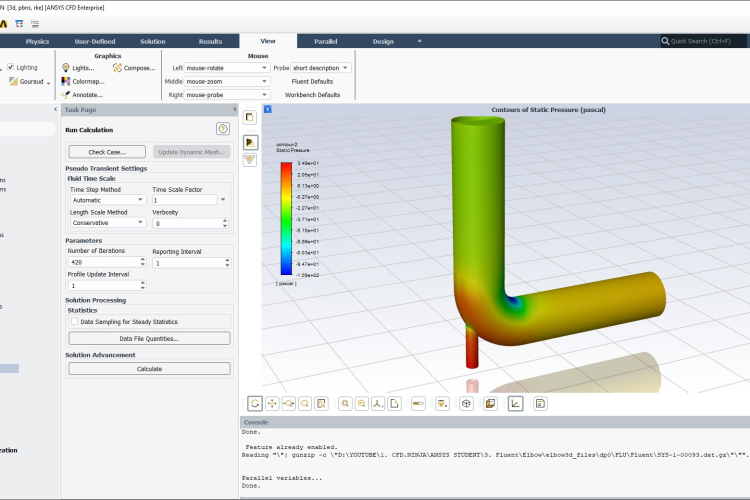
Computational Fluid Dynamics (CFD) is one of the most advanced and accurate methods used to study fluid flow, heat transfer, and other engineering problems through computer simulations. Today, engineers use powerful cfd software like ANSYS Fluent to analyze complex systems without relying only on physical testing. In the past, performing CFD simulations required engineers to manually create computer codes based on mathematical equations, which took a lot of time and required strong programming skills. With the development of modern simulation tools, engineers can now perform detailed analysis faster and more efficiently using software designed specifically for fluid and airflow heat transfer studies.
ANSYS Fluent is one of the most widely used CFD simulation tools in engineering. It helps users study different fluid behaviors, heat transfer processes, and other physical conditions by solving complex equations inside a virtual environment. The software is used in many industries, including automotive, aerospace, energy, manufacturing, and building design. This article explains what ANSYS Fluent is, how beginners can learn it, the main simulation steps, and how to understand the results properly.
What Is ANSYS Fluent and How Can You Learn It?
Overview of ANSYS Fluent
ANSYS Fluent is a commercial CFD software developed for solving fluid flow and heat transfer problems. It uses the finite volume method, which is a numerical approach that divides a problem into many small sections called cells. By analyzing these small sections, the software can predict how fluids move, how heat spreads, and how different materials interact.
One of the reasons ANSYS Fluent is popular is because it can handle many types of simulation problems. It supports simple fluid flow cases as well as more complex studies involving heat transfer, turbulence, chemical reactions, and multiple fluids. While other simulation tools may perform better in specific areas, Fluent provides reliable performance across a wide range of engineering applications.
For example, some software is mainly designed for certain industries or specific problems, but ANSYS Fluent is known for being flexible and useful for many different CFD projects. This makes it a common choice for students, researchers, and engineers who want to develop strong simulation skills.
Steps to Learn ANSYS Fluent
Learning ANSYS Fluent requires understanding both the basic ideas behind CFD and how to use the software tools. Beginners should start by building a strong foundation in fluid mechanics, heat transfer, and numerical methods.
To understand fluid flow simulations, it is important to learn basic concepts such as the Navier-Stokes equations, conservation of mass, flow conditions, and material properties. A good understanding of fluid mechanics helps users know what is happening inside the simulation instead of only following software instructions.
For heat transfer simulations, users should understand the main types of heat transfer, including conduction, convection, and radiation. These concepts help in setting up accurate simulation conditions and understanding the results.
After learning the basics, beginners can explore ANSYS Fluent tutorials, online courses, and practice projects. The official documentation and beginner guides provided by ANSYS are useful resources because they explain different features of the software. Practicing with simple projects is one of the best ways to improve because it allows users to understand the complete simulation process.
Another important skill is learning how to analyze and present simulation results. Creating a simulation is only one part of CFD work. Engineers also need to explain the results clearly using graphs, images, and data analysis. Good presentation helps others understand the findings and make better decisions based on the simulation.
Simulation Process in ANSYS Fluent
Geometry Creation and Mesh Generation
The first step in an ANSYS Fluent project is creating the geometry. The shape or model represents the area where the fluid or heat transfer process will be studied. ANSYS provides tools such as DesignModeler and SpaceClaim for creating and editing geometries. Users can also import models created from other CAD software.
The geometry can represent different types of systems, such as pipes, engines, buildings, or machines. The accuracy of the simulation depends greatly on how well the geometry represents the real object.
After creating the geometry, the next step is mesh generation. Meshing divides the model into thousands or even millions of small cells. These cells allow Fluent to calculate what happens in each part of the system.
A high-quality mesh improves the accuracy of results. Smaller cells are usually created in areas where changes happen quickly, while larger cells can be used in areas with fewer changes to reduce computer processing time. Mesh quality is checked using factors such as cell shape and smoothness to make sure the simulation will run properly.
Setting Up the Simulation and Analyzing Results
After the geometry and mesh are prepared, the simulation setup is completed inside ANSYS Fluent. At this stage, users define the important conditions of the problem, including the type of fluid, material properties, boundary conditions, and simulation models.
Users must select the correct settings depending on the purpose of the study. For example, a heat transfer problem requires different settings compared to a simple airflow simulation. The simulation can also be set as steady-state, where conditions do not change over time, or time-dependent, where changes are observed during a specific period.
Once everything is prepared, the simulation is started. During this process, Fluent solves the equations and produces results. Sometimes problems may occur, such as the simulation failing to reach a stable solution. When this happens, engineers may need to improve the mesh, adjust settings, or review the simulation conditions.
After completing the simulation, the final step is post-processing. This involves reviewing and understanding the results produced by Fluent. Engineers can study pressure, temperature, velocity, and other important values through graphs, charts, and visual displays.
Tools like CFD-Post and other visualization software can help create clear images such as pressure and temperature maps. However, understanding the meaning of these results requires knowledge and experience because the numbers alone do not always explain what is happening in the system.
Conclusion
ANSYS Fluent is a powerful tool that helps engineers solve complex fluid flow and heat transfer problems through computer simulation. Learning this software requires knowledge of CFD basics, practice with different projects, and experience in analyzing results.
From creating geometry and generating a mesh to setting up simulations and reviewing results, every stage plays an important role in producing accurate findings. With continuous practice and proper learning resources, ANSYS Fluent can become a valuable skill for engineers working in many industries.